Snag List with Status Dashboard
A ready-to-use snag list format in Excel for tracking site defects through to close-out. Log each snag by location, trade and severity, update its status, and let the dashboard show your % complete, overdue items and snags-by-location automatically. Built for Microsoft Excel 2016+.
There is also a lightweight version of this template: Snag List Tracker · Free
Closing out a project means clearing every defect, and this free snag list format in Excel keeps that under control. Log each snag with its location, trade and severity, set the status from open through to verified, and the template calculates how many days each item has been open automatically. Conditional-formatting flags make open, in-progress and closed snags obvious at a glance.
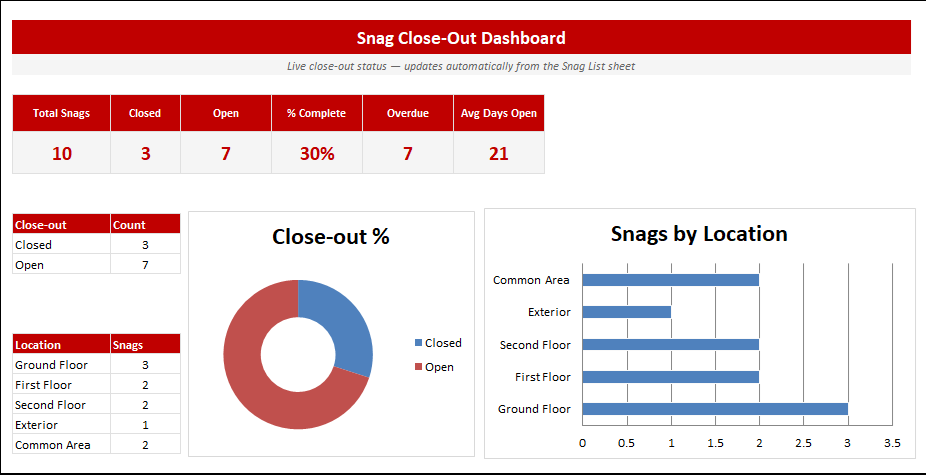
The status dashboard shows your close-out percentage, open and overdue snags, average days open and a breakdown by location, all updating live. Built for Microsoft Excel 2016+, it comes with sample snags so it is ready to use from the first row.
Key features
- Log snags by location, trade and severity
- Colour-coded status flags
- Automatic days-open calculation
- Close-out % and overdue tracking
- Snags-by-location breakdown
- Built for Microsoft Excel 2016+
This template is designed for site managers, construction project leads and contractors who need to track snagging, tasks and site progress — without the need for expensive specialist software.
The Snag List with Status Dashboard is part of our Construction & Engineering collection — downloaded 18 times and counting. Built from real-world experience by the ExcelGurukul team and tested across multiple industries and roles.
Frequently asked questions
Is the snag list free?
Yes, free instant download, no sign-up.
Does it track close-out progress?
Yes, the dashboard shows close-out % and overdue snags live.
Can I add my own locations and trades?
Yes, the dropdown lists are fully editable.