Lessons Learned Report
Capture and document project lessons learned for future projects.
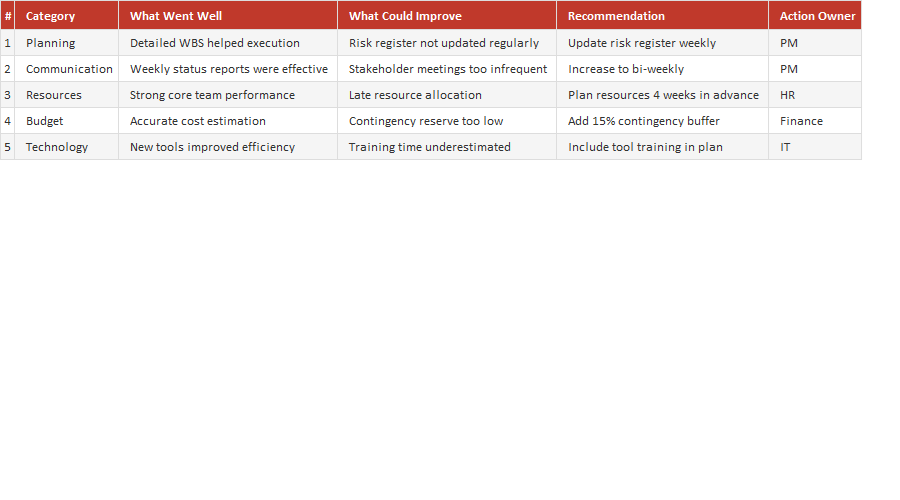
The value of a project's lessons is lost unless they're written down. This free Lessons Learned template captures what went well, what didn't, and what to do differently next time — turning hard-won experience into a reusable asset instead of mistakes that get repeated.
How to use it: at key milestones or project close, record each lesson with the situation, the impact and a concrete recommendation. Categorise by area (scope, schedule, communication, and so on) so future teams can find what's relevant to them.
Key features
- Capture what went well and what didn't
- Concrete recommendations for next time
- Categorised by project area
- Builds organisational knowledge
- Works in Excel and Google Sheets
This template is designed for professionals and teams working in Project Management ⭐ who want to manage Closure Phase tasks efficiently in Microsoft Excel — without the need for expensive specialist software.
The Lessons Learned Report is part of our Project Management ⭐ collection — downloaded 6 times and counting. Built from real-world experience by the ExcelGurukul team and tested across multiple industries and roles.
Frequently asked questions
Is the lessons learned template free?
Yes, free download, no sign-up.
When should I capture lessons?
At key milestones and at project close, while they're fresh.
What should each lesson include?
The situation, its impact and a recommendation.
Is it editable?
Fully editable in Excel or Google Sheets.