Status Dashboard
Executive project status dashboard with RAG indicators.
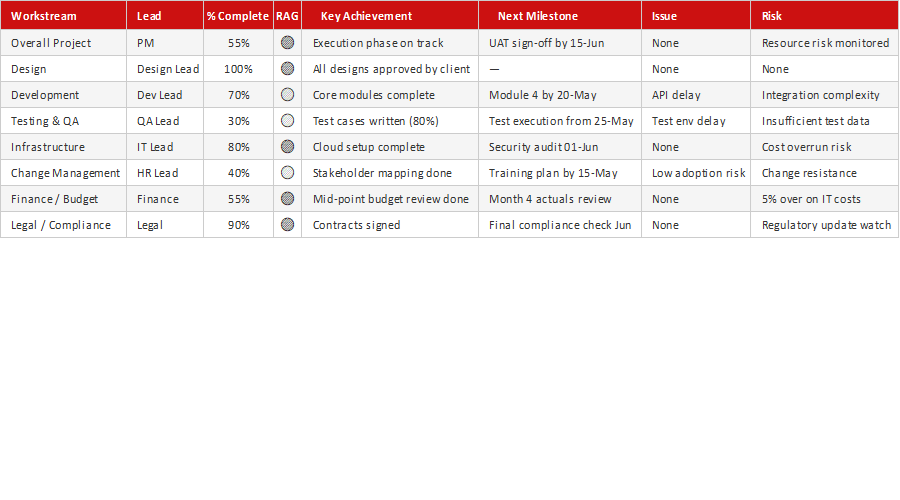
Leaders don't want a 20-page report — they want to know, at a glance, whether the project is on track. This free Project Status Dashboard gives them that: a one-page view with RAG (red/amber/green) indicators, milestones and the key metrics that matter, so status updates take seconds to read and minutes to prepare.
How to use it: update the RAG status for each area, refresh the milestone and metric figures, and add a short narrative on progress and blockers. Use it as your standing weekly or monthly status view for sponsors and steering committees.
Key features
- One-page executive status view
- RAG (red/amber/green) indicators
- Milestones and key metrics
- Ready for steering committees
- Works in Excel and Google Sheets
This template is designed for professionals and teams working in Project Management ⭐ who want to manage Execution Phase tasks efficiently in Microsoft Excel — without the need for expensive specialist software.
The Status Dashboard is part of our Project Management ⭐ collection — downloaded 9 times and counting. Built from real-world experience by the ExcelGurukul team and tested across multiple industries and roles.
Frequently asked questions
Is the status dashboard free?
Yes, free with no registration.
What are RAG indicators?
Red/Amber/Green status flags that show health at a glance.
Can I use it for weekly reporting?
Yes, it's designed as a standing status view.
Is it editable?
Fully editable in Excel or Google Sheets.