Subcontractor Payment Tracker
Track all subcontractor contracts invoices advance payments retention net payable amounts and payment status
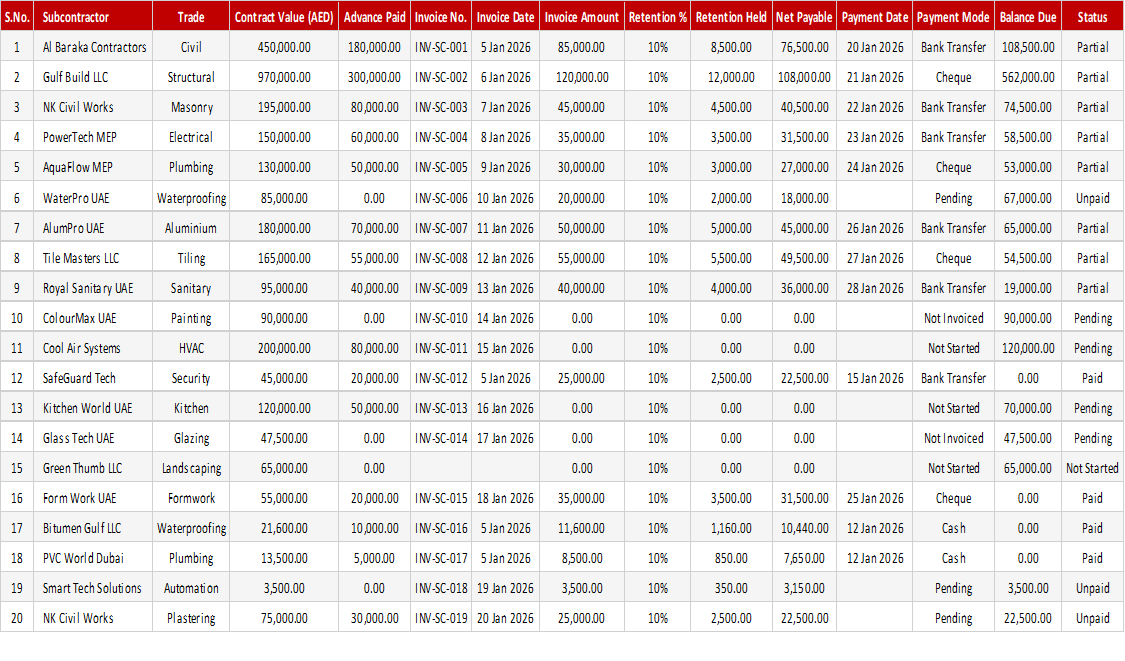
Subcontractor payments get complicated once advances, retention and part invoices are involved. This free subcontractor payment tracker records each contract, the invoices raised, advance payments, retention held, net payable amount and payment status in one sheet, so you always know what is owed and what is paid.
How to use it: add each subcontractor and contract value, log invoices and advances as they occur, record the retention held and check the net payable before releasing payment. Filter by payment status to see which subcontractors are still pending.
Key features
- Contract, invoice and advance tracking per subcontractor
- Retention held recorded
- Net payable amount for each payment
- Payment status you can filter on
- Suited to site and project teams
- Opens in Excel and Google Sheets
This template is designed for professionals and teams working in Construction & Engineering who want to manage Project Costing tasks efficiently in Microsoft Excel — without the need for expensive specialist software.
The Subcontractor Payment Tracker is part of our Construction & Engineering collection — downloaded 23 times and counting. Built from real-world experience by the ExcelGurukul team and tested across multiple industries and roles.
Frequently asked questions
Is the subcontractor payment tracker free to download?
Yes, it is a free download with no sign-up required.
What is retention?
Retention is a portion of each payment withheld until the work is completed or the defects liability period ends, as set out in the contract.
Does it track advances?
Yes. Advance payments are recorded so they can be accounted for in the net payable.
Can I track many subcontractors?
Yes. Add one row per contract or invoice and use filters to look at one subcontractor at a time.