Quarterly Review Dashboard
Executive quarterly review dashboard with KPI tracking.
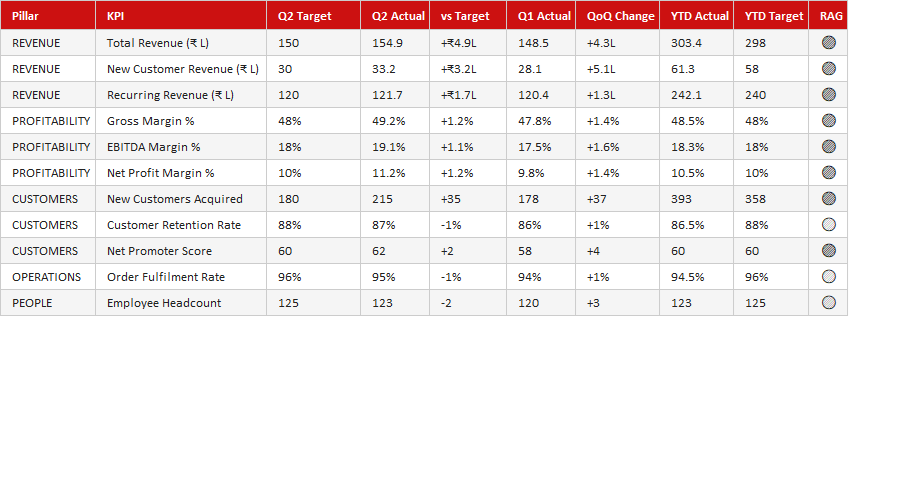
A quarterly review should show the story of the quarter at a glance. This free Quarterly Review Dashboard pulls performance against goals, key metrics and trends into one visual view, so QBRs focus on decisions and direction rather than assembling numbers from scratch each time.
How to use it: enter the quarter's results against targets and the dashboard visualises performance and trends. Use it for quarterly business reviews with leadership, clients or your team, and keep each quarter's copy to show progress over time.
Key features
- Quarterly performance vs goals
- Key metrics and trends
- One visual review page
- Ready for QBRs with leadership
- Built for Microsoft Excel 2016+
This template is designed for company secretaries, governance officers and board administrators who manage meeting minutes, resolutions and action tracking — without the need for expensive specialist software.
The Quarterly Review Dashboard is part of our Corporate & Governance collection — downloaded 7 times and counting. Built from real-world experience by the ExcelGurukul team and tested across multiple industries and roles.
Frequently asked questions
Is the QBR dashboard free?
Yes, free download, no sign-up.
What is a QBR?
A Quarterly Business Review of performance against goals.
Is it ready to use?
Yes — enter your results and the dashboard updates.
Which Excel version do I need?
It works best in Microsoft Excel 2016 or later.