Recruitment Tracker with Dashboard
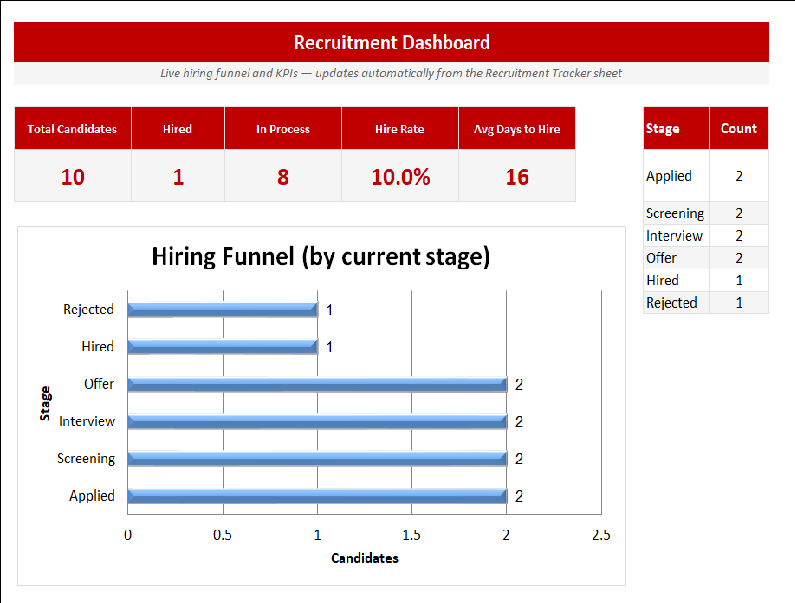
Dashboard sheet: live KPIs (Total, Hired, In Process, Hire Rate, Avg Days to Hire) and a hiring-funnel chart — all auto-updating from the tracker. Tracker sheet: candidate pipeline with dropdowns (Source, Stage, Rating), automatic "Days in Pipeline," and conditional-formatting colors on stage (Hired=green, Rejected=red, Interview=amber, etc.).
There is also a lightweight version of this template: Job Application Tracker · Free
Hiring gets messy when candidates are scattered across emails and notes. This free Recruitment Tracker keeps every applicant in one place — name, role, source, stage, interview and decision dates — and works out each candidate's days in the pipeline automatically. Colour-coded stages show at a glance who is screening, interviewing, offered, hired or rejected.
A built-in dashboard turns that list into instant insight: total candidates, hires, hire rate, average time-to-hire and a hiring-funnel chart that updates as you type. Built for Microsoft Excel 2016+, it ships with sample data you can simply overwrite.
Key features
- Track candidates from applied to hired
- Colour-coded pipeline stages
- Automatic days-in-pipeline calculation
- Hiring funnel chart and KPIs
- Hire rate and average time-to-hire
- Built for Microsoft Excel 2016+
This template is designed for HR managers, recruiters and hiring teams who need to track job applications, manage candidate pipelines and speed up hiring decisions — without the need for expensive specialist software.
The Recruitment Tracker with Dashboard is part of our HR & Workforce Management collection — downloaded 14 times and counting. Built from real-world experience by the ExcelGurukul team and tested across multiple industries and roles.
Frequently asked questions
Is the recruitment tracker free?
Yes, free instant download, no sign-up.
Does it calculate time-to-hire?
Yes, days in pipeline and average time-to-hire update automatically.
Will it work in my Excel?
It is built for Microsoft Excel 2016 and later.