Expiry Date Tracking Register
Track stock expiry dates with batch numbers quantities storage conditions days to expiry and action required per item
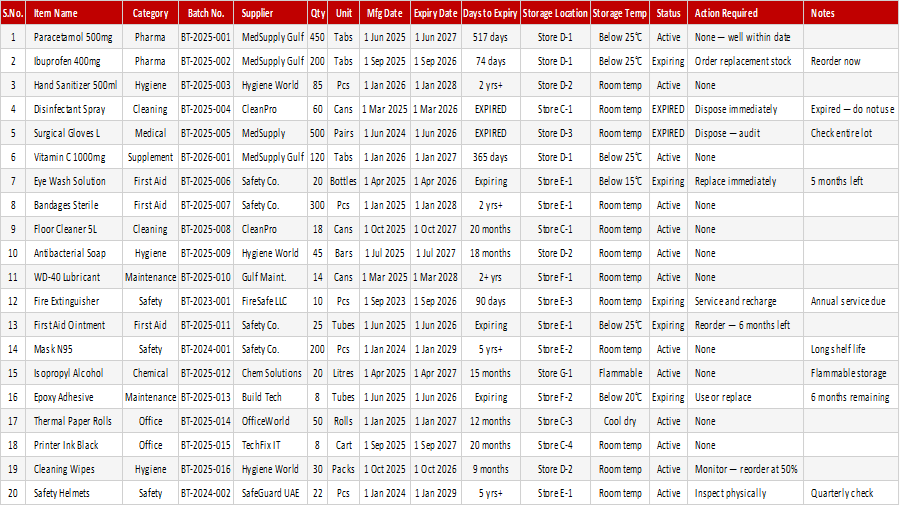
Where stock has a shelf life, such as medicines, food and chemicals, an expiry register is both a control and a loss-prevention tool. This free expiry date tracking register records batch number, quantity, storage conditions, days to expiry and the action required for each item.
How to use it: enter each batch with its expiry date and quantity, check the days to expiry and note the action, such as sell first, return to supplier or dispose. Review it weekly. For a simpler batch list, see the Product Expiry Date Tracker.
Key features
- Batch number and quantity for every item
- Storage conditions recorded
- Days to expiry shown for each item
- Action required noted per item
- Suited to stores, pharmacies and warehouses
- Opens in Excel and Google Sheets
This template is designed for professionals and teams working in Inventory & Logistics who want to manage Inventory Management tasks efficiently in Microsoft Excel — without the need for expensive specialist software.
The Expiry Date Tracking Register is part of our Inventory & Logistics collection — downloaded 19 times and counting. Built from real-world experience by the ExcelGurukul team and tested across multiple industries and roles.
Frequently asked questions
Is the expiry date tracking register free to download?
Yes, it is a free download with no sign-up required.
What actions can I record?
Typical actions are sell first, discount, return to supplier or dispose; you can write whatever fits your process.
How is it different from the Product Expiry Date Tracker?
This register adds storage conditions, days to expiry and action required; the tracker is a simpler batch and expiry list.
How often should I review it?
Weekly is a good routine, and daily for products with a short shelf life.