Warehouse Bin Location Register
Map all warehouse bin locations with zone aisle shelf level SKU item description current quantity capacity and stock status
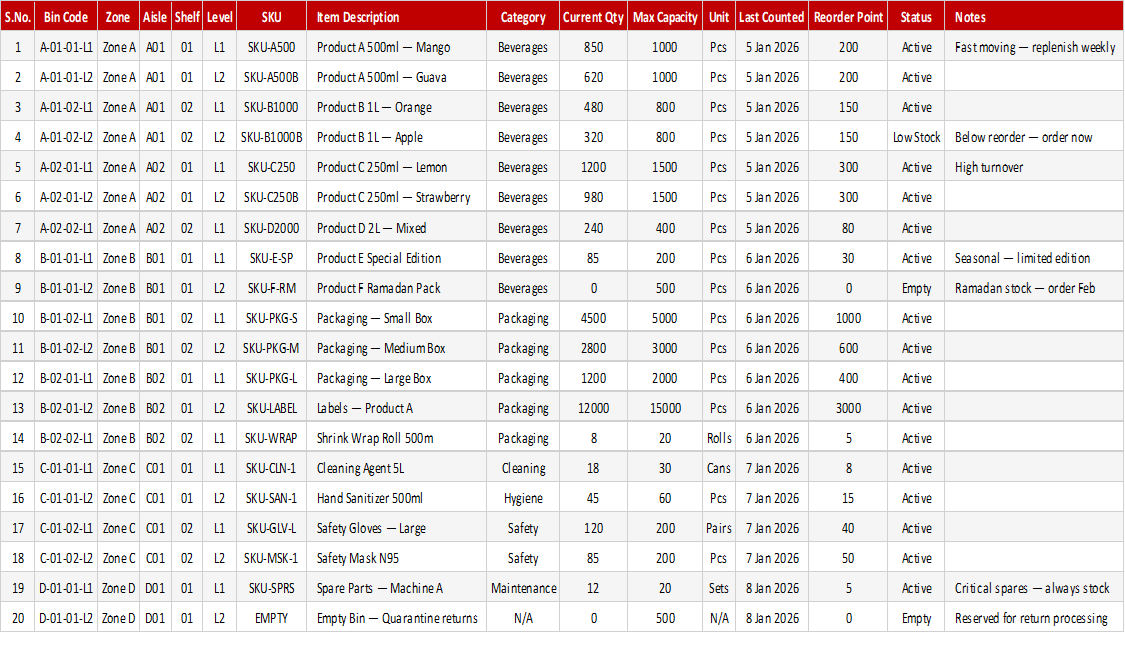
When pickers cannot find stock, the problem is usually that bin locations live in people's heads. This free warehouse bin location register maps every bin by zone, aisle, shelf and level to the SKU stored there, with the item description, current quantity, capacity and stock status.
How to use it: create one row per bin, assign the SKU and description, enter current quantity against the bin's capacity and review the stock status to spot empty or full bins. Update it whenever stock moves, and filter by zone or aisle when planning cycle counts.
Key features
- Zone, aisle, shelf and level addressing
- SKU and item description for every bin
- Current quantity against bin capacity
- Stock status for each location
- Filter by zone or aisle for cycle counts
- Opens in Excel and Google Sheets
This template is designed for professionals and teams working in Inventory & Logistics who want to manage Inventory Management tasks efficiently in Microsoft Excel — without the need for expensive specialist software.
The Warehouse Bin Location Register is part of our Inventory & Logistics collection — downloaded 66 times and counting. Built from real-world experience by the ExcelGurukul team and tested across multiple industries and roles.
Frequently asked questions
Is the warehouse bin location register free to download?
Yes, it is a free download with no sign-up required.
What is a bin location?
A bin location is the specific address of a storage space in a warehouse, usually written as zone, aisle, shelf and level.
Does it replace a warehouse management system?
It suits small and mid-size warehouses that manage stock in Excel. Larger operations usually need a dedicated warehouse management system.
Can I add my own location codes?
Yes. The columns are editable, so you can follow your own zone and rack naming.